A horizontal scrollbar will appear only when content doesn't fit into the window. Drag the slider at the bottom-right to change the horizontal spread.

If you make a mistake, press <ctrl-Z> to backtrack, step-by-step.
Confirm that Normal Record is selected. Click the chevron to the right of the record button... 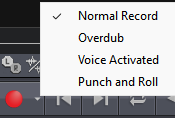
To pause recording, hit the two-lined pause button  not stop. Click it again to resume.
Check out Wavepad tutorials here, and search the net for many more.