Method 1 in the above linked AI-generated text (not video) was incorrect. Updating that...
The formula tags you are remembering (%MM%, %DD%, %YYYY%, %HH%, %MIN%) belong to Debut Video Capture Software, which burns the real-world recorded clock time into a file while it is recording. Once you bring a clip into VideoPad, it treats text fields as standard text and cannot evaluate those specific percent-sign variables.
While related, Prism and Debut are separate programs that are fully functional for a short while on a trial basis. You might check them out.
Clips imported into the VP bin start with a counter at zero. They don't inherit timecode from the source clip.
When clips are placed on the timeline, it begins at zero. And, like the source clips in the bin, the counter increments to the end. No individual clip codes on the timeline.
That said, start times for counters can be set in the text composer window... 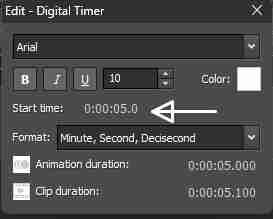
Thus, timeline clips would each have their own counter when they are individually added to the overlay track, as in this rough example...
Counter.mp4 If this doesn't accomplish what you have in mind suggest that you write the company again and provide your earlier supportive emails.