Laguna wrote:
I have a track, the middle part of which I want to have more of reverb effect. The problem is I want to add that effect only to that one middle part of the track while keeping the rest of it unchanged. I thought I could do that by simply splitting the track into three clips, the middle part being the second clip, and adding effect to the second clip. But then I discovered that the added effect is affecting the whole track. So, I wonder if it's possible to add an effect to only one given clip on the track or the only way to go around it is to duplicate the track for editing only that middle part?
Hi!
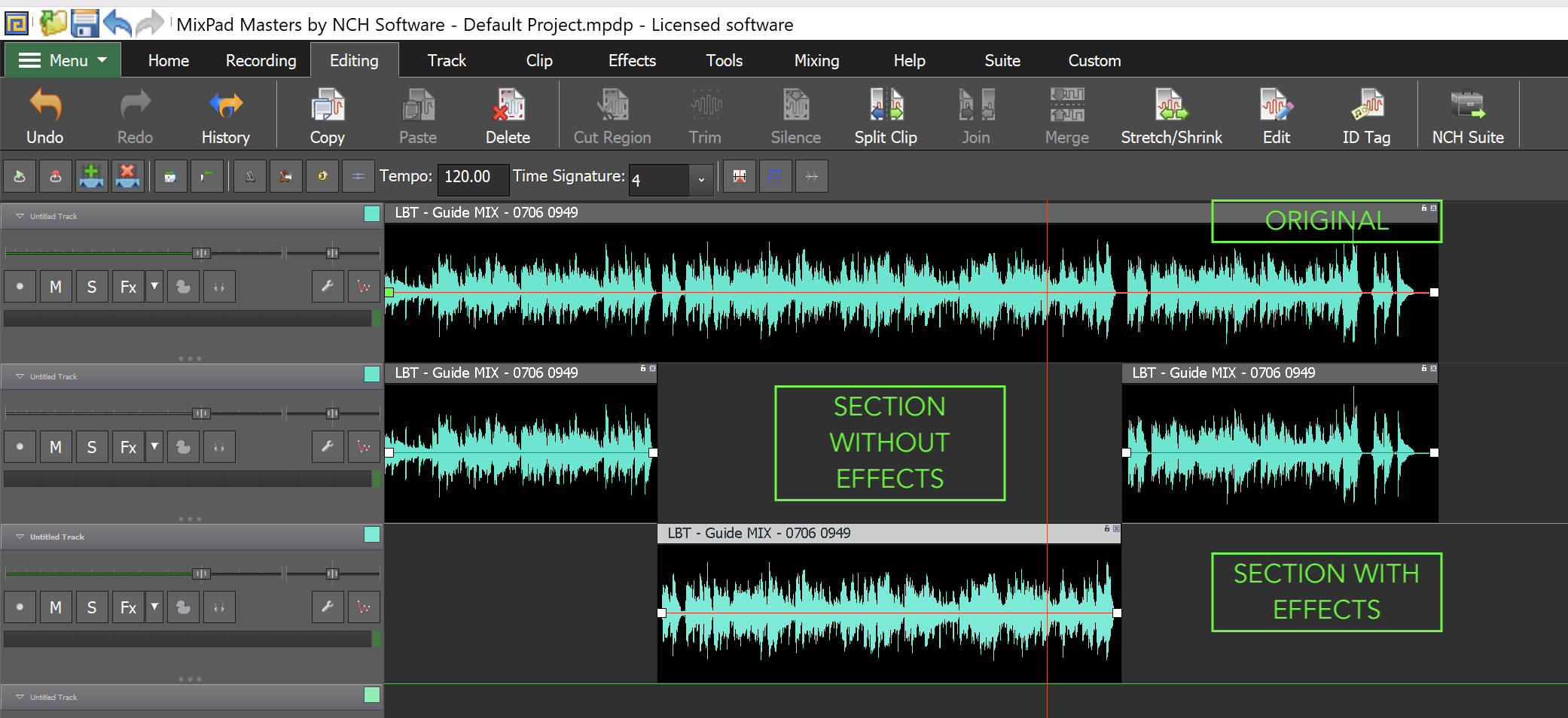
In this case, what you can do is duplicate the audio clip, retain that on the first track.
Then the second track which contains the duplicated clip, "split" and choose what regions you want to apply effects onto.
Then on the third track, put there the "middle" clip which you want to apply effects onto. On this track is also where you will add your desired effects.
Your MixPad timeline will look something like this (refer to attached screenshot).