Hi
"........My version of Videopad doesn't have a sequence bin....."
As stated..All version of VP have a sequence bin. The bin area is the space at the upper left of the GUI initially labelled Drag files and folders here. It's where loaded files appear as thumbnails. Depending on the file type VP places them in different bins. At the top of this area you will see the bin labels Sequences ..Video files .. Audio files .. Images. These are followed by a + which, if you click, will allow you to add further bins. Each bin has its own background logo like a camera or speaker or images.
If the width of the bin area is not wide enough (it can be adjusted) some of those labels may not be visible. If this is so then click the white triangular arrow which will slide the labels in either direction.
You should now be able to uncover the Sequences tab which is to the left. You cannot see it probably as the total bin area may be too narrow or you haven't moved the headings along to the right.
On opening VP the Sequences bin will NOT be empty. It will contain a blank sequence labelled Sequence 1 which has a clapperboard thumbnail....
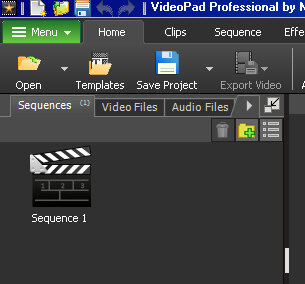
This is because VP needs a "space" into which it can copy the contents of the timeline.
As soon as anything is added to the timeline (Image/Video clip/audio or text clip) Sequence 1 becomes the copy of the timeline; no matter how many clips are added. The clapperboard icon changes to a thumbnail of the clip first placed on the timeline........
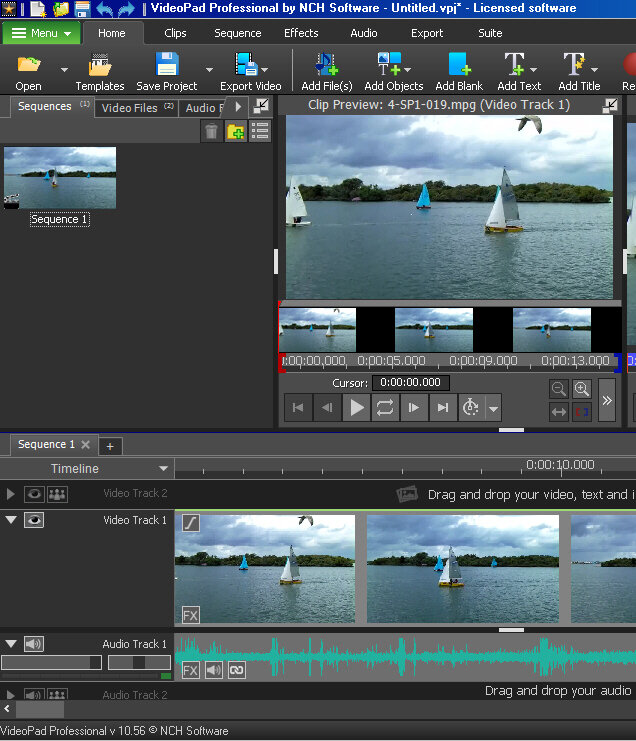
Sequence 1 is, in effect, a copy your project as you have it at a specific editing point. It is a copy of the whole timeline and won't have a green tick. As explained, right clicking the Sequence 1 thumbnail (not the clapperboard) in the bin brings up a list of options which includes saving the complete audio for the sequence as a separate file. This is always a .wav file and is the complete audio clip of your project. Two copies of this are created; one goes into the Audio bin and the other is saved to your PC in a file designated in VP Options/Disk/Captured audio
Hope this makes things a bit clearer.
Nat

