Nationalsolo wrote:
Hi
Further to this ....
With the display set in a "normal" preview window size arrangement this method will remove the unused clips from only the one bin displayed and will need repeating for each bin in turn.
However if you drag the preview screen(s) as wide as possible by dragging the vertical white bar to the left all the bins will display one under the other as they all become narrow with a vertical scroll bar to the right instead of at the top. It's easier to see if you switch to List view ........
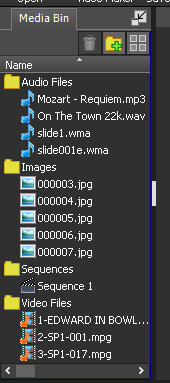
The Ctrl+A step will now highlight all the bins together. The method (using Cancel) will now remove unused clips from all the bins in one go. The exception will be the sequence bin.(You can't delete a sequence if it is the last one,) so simply skip that when it is prompted.
Nat
I just tried this...it depends on how wide your screen is. On a 4k monitor, it wouldn't switch to that view until I un-maximized the window to a 1080p or so size. In addition, while I'm not sure if it matters, the bin folders were all closed, so if they need to be opened to do this, it seems to require an additional double-click on each. And opening a large bin in the group apparently crashed the program.
Beyond all that, I'd add that there's a glaring inconsistency in that the "list" view does not indicate which clips are being used, unlike the thumbnail view, which shows green checkmarks on used clips.