Hi
You want your text to fade out over 10 seconds? From your description it seems all you need to do is to drag your text clip out so it finishes where your audio finishes. The text clip will be on Video Track 2 by default. Click the downward sloped icon at the right hand end of the text clip and choose the Fade through Black transition. You can alter the duration to 10 seconds. If the text clip is actually less than 10 seconds it's not a problem as the text clip on Track 2 will fade out to black whatever its length.
If the text clip is more than 10 seconds after it has been pulled out just enter 10 in the transition duration box and the last 10 seconds will be the amount faded as shown by the transition bar at the top of the clip........
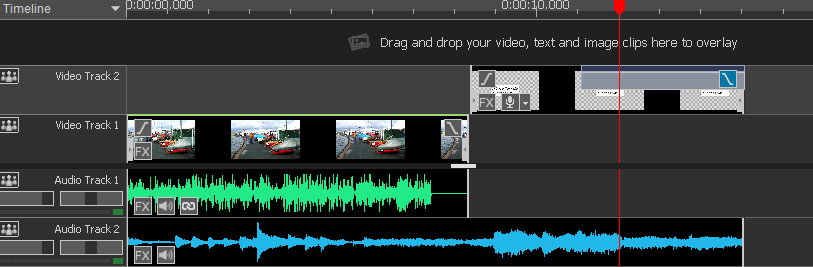
Timeline should look similar to above......Track 1 clip plays......Text opens on black background and last 10 seconds fades out to black as the audio on Audio Track 2 finishes. There is no transition X as text is on Track 2.
If you drag text down to Track 1 you will see a transition X and a transition can be added between the clip and the text. Time line will now look similar to this...
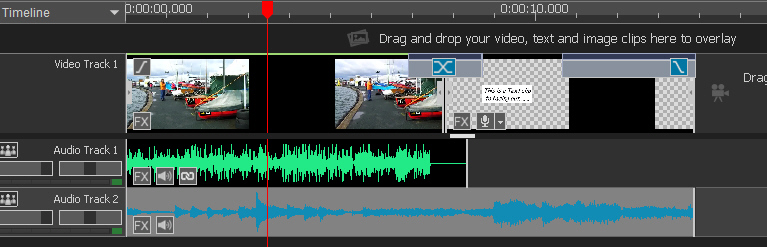
Clip plays.......text fades in.........text fades out to end with Audio Track 3.
Nat

