Hi gdog
Sorry, I can't find a problem here. With the setup you describe, dragging the Time line cursor along to the right always cleanly moves the Sequence Preview to Clip 2.
The only thing possibly a little incorrect (but it's not a problem) is that whichever part of the timeline has the focus, Clip 1 or the image on track 2, and you then drag the Clip Preview cursor line along to the right to review it , when it gets to the end, the Sequence Preview shows the first frame of Clip 2 even though, on paper you haven't actually got to clip 2. To my way of thinking it ought to simply stop with the last frame of the clip being reviewed. But as i said it's not a problem.
Are you certain that the image on Track 2 is actually ending at the join and not a few frames to the left of it? Try dragging the image on Track 2 back left a little and then along to the right again....you should see a white dotted vertical line appear at the join when it gets into the "snapping zone"
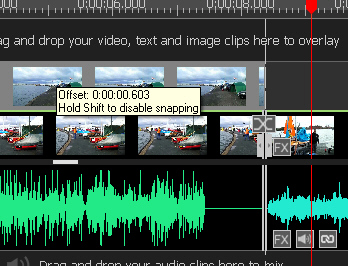
If snapping is enabled there should be an area of two or three frames (Perhaps more) either side of the join where it will snap into position to the dotted line.
Why is there a need to move Clip 2 a bit and let it snap back? Both clips link together with no problem on being dropped onto Track 1. There seems to be no overlap or gap.
I'm using VP 10.43
Nat

