Hi
VP.exe is the loader for running the program usually a shortcut.. You can delete it but this does not remove the program
If you haven't moved things right click the icon and open the folder where it says it is, usually Program files/NCH Software/Videopad. You should now see the uninstall option ...
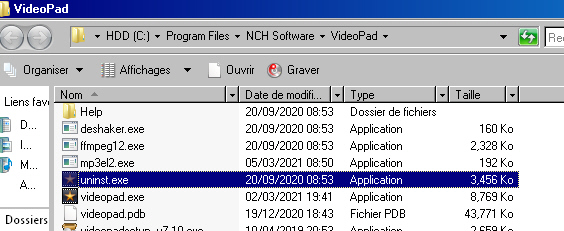
Double click and it should remove VP.
You can also go to to your control panel and find the PC program Function/Uninstaller listing all the programs on your PC. This is a Vista French PC but it will look a bit similar...
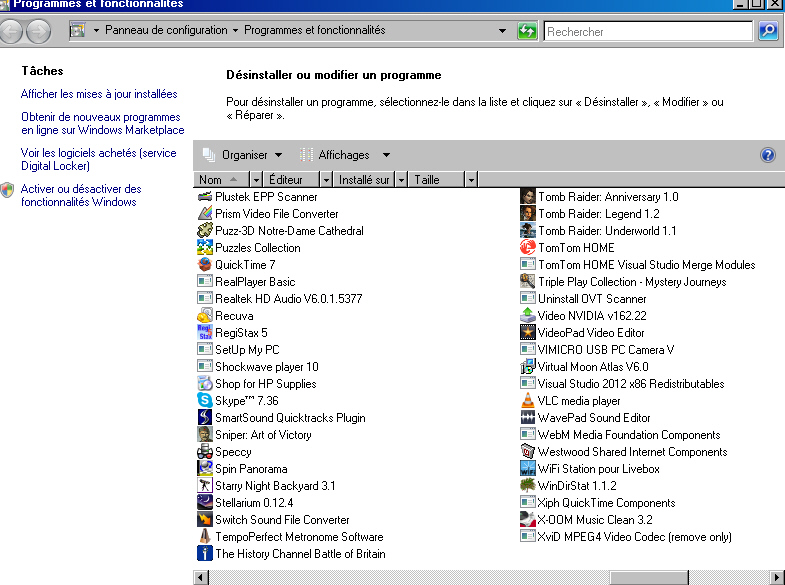
Scroll around and you should now see Videopad Editor somewhere on the list. Click this and follow the prompts. It does the same thing. You may then need to remove the registry entries if they get left behind HKEY_CURRENT USER/Software/NCH Software/VideoPad and the VP shortcut if you have one, perhaps on the desktop. This usually removes the software if that is what you want.
You can also use Revo uninstaller which will remove all files relating to the program you specify. (Check it out on Google) You don't need to remove the original setup.exe file as this will allow you to reinstall VP should you want to.
Nat