Hi
You do seem to be having problems. 🙁
"...unfortunately that's not the case for the next clip......"
Certainly there seems to be something odd about this. The X for the transition is not on the join; something which I haven't seen before, but the join itself only has the right white drag boxes for clip ends. (The screen image from YT is a bit blurred but it's obvious there is only one..on the right hand clip) ... again, something I have never seen before...
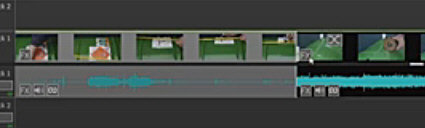
There should be one on the left hand clip and one on the right hand clip.....like your other clip joins..e.g..
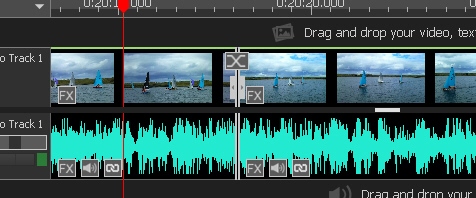
And the Transition X....That is weird. Have the clips been trimmed at all and if so how was it done?
I agree with you that it seems from your video that the video FX and Audio FX buttons are not working correctly or perhaps at all, but assuming there IS something wrong with that clip or the way it was added that affects those buttons , I think Unlink would work in any scenario since I don't think there is a connection between that feature and the Volume and FX buttons which are the one's that are faulty. It would seem to point to THAT clip and not specifically VP. (If the clip is faulty then VP can't read it correctly..the vpj data for that clip may also be corrupt (although read correctly) so the error will always appear since VP is using this to load the project.
I can't understand why your system takes so long to close. Here, on a slower Vista PC a project with 250 HD MP4 clips , fully cached closed in around 3 seconds. Normally if closed too soon then threads have to be stopped...VP may be generating/copying data but normally displays a progress window while it does this. Didn't see that in you vid.
After the reload in your video, the clip with the faulty buttons still only showed a single white block at the join. Try jumping the cursor line along using II> or II< so it sits on the join with the problem..does it actually get there? If it does delete the clip to the right and then reload it from the bin to the cursor position and see if things change.
Another couple of questions...
Has the right hand clip beem trimmed in the bin using the red/blue brackets in clip preview?
Has the right hand clip been trimmed from the timeline with the red/blue brackets?
Is it always the same join?
I tend to trim either by dragging the white bars in/out or by splitting at the cursor and ripple deleting the unwanted section. Again, never seen this particular problem before.
Nat
