Hi
"...Is there a way for VideoPad to display the actual size of the image?..."
As far as I know this is not possible. as these things are all relative.
VP will always enlarge an image to fit the preview window. Your image of the black line is 480 x 20 pixels. It is enlarged in this case until the width (being the greatest dimension) fits the preview screen horizontally...
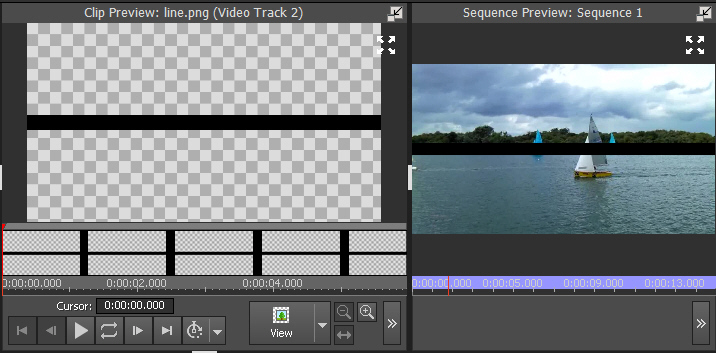
In this case the line is on Video Track 2 with a 1280 x 720 video clip on Video Track 1 In essence now the line has been enlarged until the width is essentially 1280 pixels long.
As Borate notes you simply need to apply a Scale effect to reduce it to the required size, keeping the AR unaltered and monitoring the changes in the Sequence Preview screen.
If, however you want an EXACT scale down (relative to the screen...that is .the image behind it,) you need the divide the width of the line image (480) by the width of the clip image (1280)
480/1280 = 0.375.
So, add a Scale effect to the line image and then (without altering the AR) slide the H or V scale down to 0.375 ....
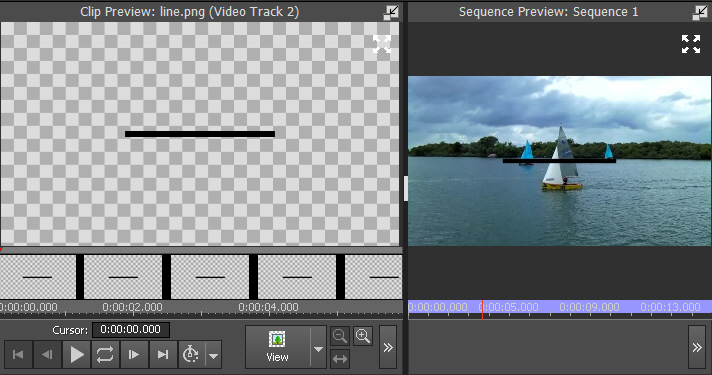
Relative to the video clip now, the line is 480 pixels. Had the background image been bigger the scale would have been smaller. As you can see everything is relative. The line itself is 480 pixels....how should that appear on its own in the preview screen?? There is only that screen to relate to and there is only the AR to go by. VP enlarges it to fit the basic screen.
Nat

