Hi
"....Check it there is a backup file generated by v.p. (should be in the same folder and have _backup added to the name) ..."
The autosave.vpj file is generated continuously by VP as you edit. This file is deleted when you close down VP in the normal way. If, however you experience a crash or your PC is unexpectedly switched off the autosave.vpj file does not get a chance to be deleted and will remain in the folder shown below. As you lost your project when the program (or your PC) crashed you may not have had a chance to Save or Save As, but all is not lost. Once you are up and running again, VP will know it crashed and will ask if you want to load your project from the autosaved vpj file. It may be, of course that you did Save or Save As your project before the crash, in which case you will have THAT vpj file as well as the backup file that you could load.
The autosave.vpj file is normally saved here... HDD(C🙂/(User name)/AppData/Roaming/NCH Software/VideoPad......
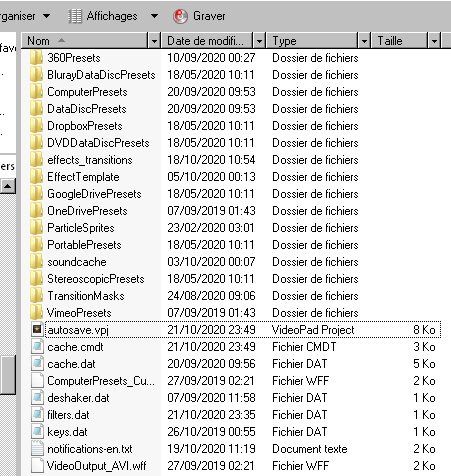
Remember it will only appear here during an editing session or after a crash.
"....for some reason my version v8.91 seems to put copies in the recycle bin. I've never seen a program do that ........."
That would imply is was deleted in some way..and I've never seen this either and I'm currently running VP 8.91 AFAIK it's not a normal feature of VP. There is a Discard option if you close VP without saving the project but that doesn't put anything into the Dustbin.
Nat