Hi
Zooming a clip and keeping it 16:9 AR or zooming into a clip that is not 16:9 will ensure that it will fill the 16:9 frame of the editor. If the original clip was 16:9 then it will just ....zoom in 🙂 and retain the same shape.
If you zoom in to a say..a 4:3 AR clip and set the effect to 16:9, the result will fill the screen. e.g....
On the left of the timeline is a 4:3 clip with an identical clip to the right of it. The second clip has been zoomed to 16:9 and is now full frame and enlarged The clip preview is of the original clip and the Sequence preview shows the 16:9 clip.
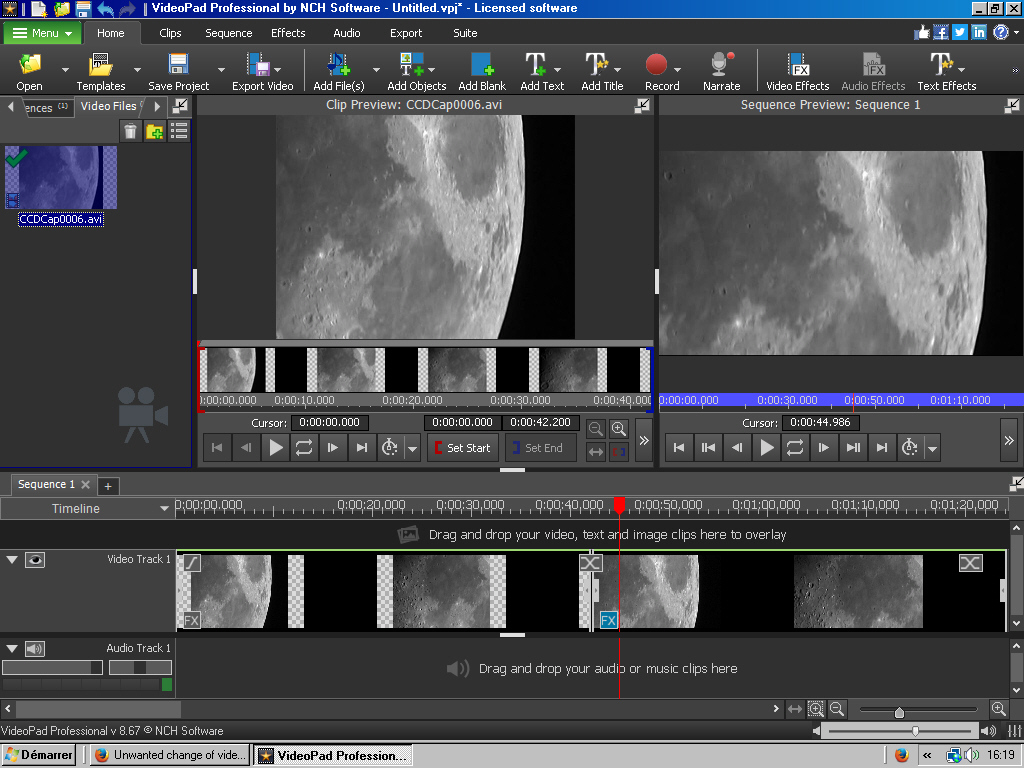
Using zoom in this way will ensure that all the clips have the same 16:9 AR. Of course some of the image will be lost but the effect control will allow you to move the 16:9 rectangle around the frame so you can select the best area.
I can't think of a reason yet why you have your problem. In short if all your clips/images are 16:9 (and preview correctly) and you export using one of the 16:9 formats then it should all be OK.
Although it may seem logical that you are losing some of the image when using zoom or crop etc., that doesn't make it any smaller volume-wise. The clip remains the same and is not made "faster"
Nat
