Hi valuenyc
Still checking for the green line you mention in your post. I have the project from Borate's link and am going through it. Here a few suggestions so far.
Because the project is basically a question/answer style video where the questions are cut out but the answers are recorded, there are places where the audio needs trimming but straight editing is difficult to do without creating difficulties..For example at around 24 seconds in, the word well has been trimmed off from the reply..... " Well ....for decades...."
The phrase end up ....(It's an answer to a trimmed off question)..."...for the average listener.... /question/ "For decades...." Which is OK on paper but here it leaves no gap/pause between the words listener and For decades Normally you can extend the split into that few seconds to create a pause, provided the visuals are the same on each clip
This style of interview and editing needs a second or two of silence between the question and the reply without any movement of the interviewee. (but spontaneity need to be maintained which is not easy.)
In this particular instance after saying "listener" the interviewee looks down but after the trimmed off "Well" he is looking up. This means that extending the LH clip to get the pause, there is a sudden jump to a different posture in the visuals at the split. So, faced with this how can we get any pause at all and still have reasonably smooth visual. The answer here is to split just after the word listener and then split again where the interviewee's head is about to move.....about 0.18 of a second in this case. All that is needed now is to make this tiny clip play for a around 1second by altering the clip speed to 20.
Now that particular split will play smoothly with hardly any head movement noticed and with a pause between sentences...and no "Well.." and No transitions or effects.......
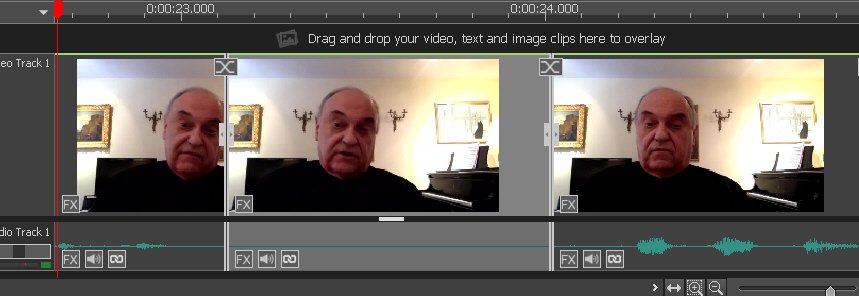
OK..Now at 1:04 there is something similar ".....I didn't know myself......" This needs a precise cut at the end of "...myself" so place the red cursor at this exactly this point (0.01:03.564) and split the clip. Mute the section you trim off. . (There may be something following this word but it's not intelligible) Now delete the tiny clip that follows (0.7 s) and delete the transparency effect on the next clip. Joined up at this point (by closing the gap) we have a similar problem to the one fixed above....there is no pause between the sentences. There is however space at the start of the RH clip so pull the end back to close the gap. Now the tempo between the clips is about correct except the speaker is taking a deep breath just after the split and before the words "...Once after..." This is easily fixed by setting the cursor line just before "..Once after...", splitting the track and muting the audio section containing the intake of breath.
That section now looks like this and plays virtually seamlessly... Again there are no transitions or effects used.
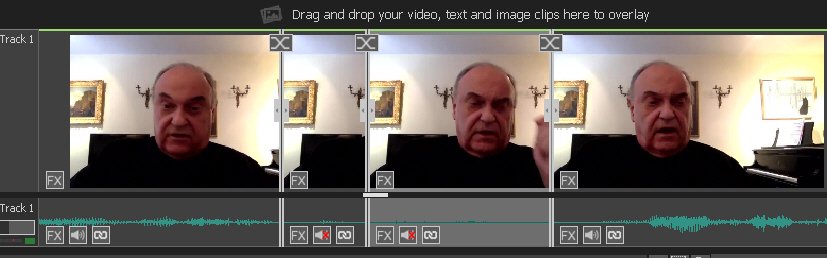
The next problem is at 1:37 where you have the same thing. Remove the transparency effect and split the track just before the words "..When you consider..." (1:38.80).Mute the section to the left of this.The problem here is that between these two takes the camera was moved so smooth over the split with a 1 second crossfade.
You should have the idea with these two examples of the majority of the editing problems and you might solve them. Hope this helps.
Treat all the remaining splits in similar ways....each one might be slightly different.and see how it goes.
In the meantime, I'll complete the remaining joins and see if it exports OK. I haven't yet seen the green bar.
Regards
Nat