HI
On the face of it, it seems you may have lost your work which is unfortunate. 🙁
With a big project or when you have put a lot of work in to one, we always suggest that you set up a destination folder with a recognizable name and location and then Save Project As FREQUENTLY, using a different name or sequential ID name each time and always save your work in it.
Can't tell why your app crashed, but as I said the autosaved .vpj should be present here..
C/Users/user name/AppData/Roaming/NCH Software/VideoPad/autosave.vpj
As an example...Here are the contents of that folder here with the autosaved vpj selected...........Note the pathway at the top...
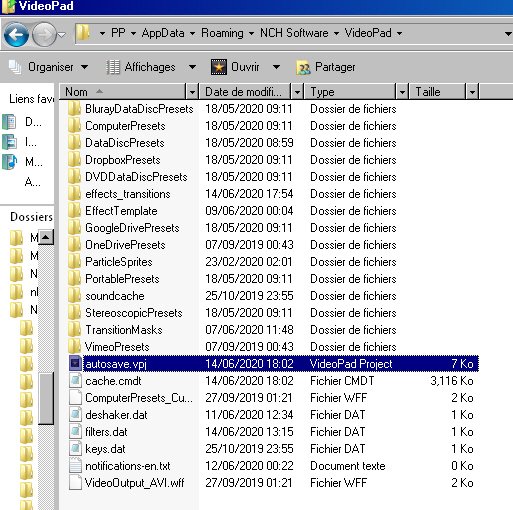
As mentioned, this file is present and updated as you work but is deleted when you quit VP.(That's why you are given the chance to save when you close the app) It the event of a crash VP doesn't get the chance to delete it and once you re-run the app you are reminded that an autosaved project is available and do you want to load it.
It could be that in your case , as you were apparently in the process of exiting VP when the crash happened, that, as you don't seem to be able to find it in the folder shown above, the autosaved file had already been deleted when you clicked the X so causing the crash.
Nevertheless do a thorough search for .vpj you still may find it, but remember that (at least here) it doesn't find the autosave.vpj in the folder above for some reason.
Nat.