Hi Fion
At 1920 x 1080 your clips are already 16:9 and don't need cropping. Without any cropping they will fill the screen. If, on the other hand you need to pick out a region within the clip, like perhaps a face or some other detail then just use the Zoom effect on its own.Don't Crop.
In the Zoom effect window set the Aspect Ratio to 16:9 and then adjust the rectangle that appears on the Clip Preview screen (see below, LHS) to outline the area of interest. There are "handles" on each side and the corners with which to do this. The rectangle will change size and/or position but will remain 16:9 as you move it.
The area you finally choose to enclose will always be full screen.....as shown here....RHS
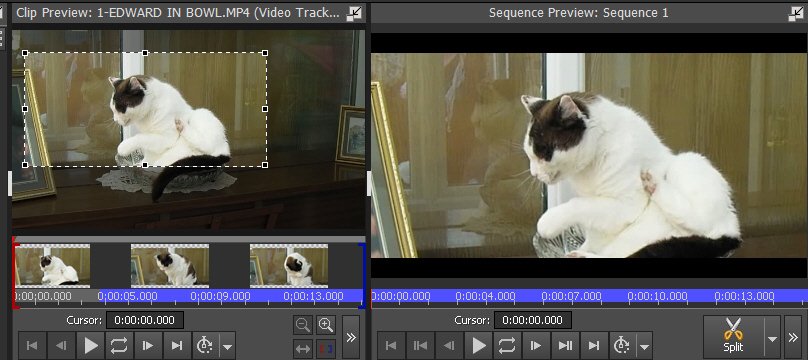
I think that may be the answer to your problem.
If your clips are 16:9 but with a vertical image in the centre -portrait orientation), Zoom will still produce a full frame image but because the image area is vertical and 16:9 is horizontal, you will lose some of the top and bottom...
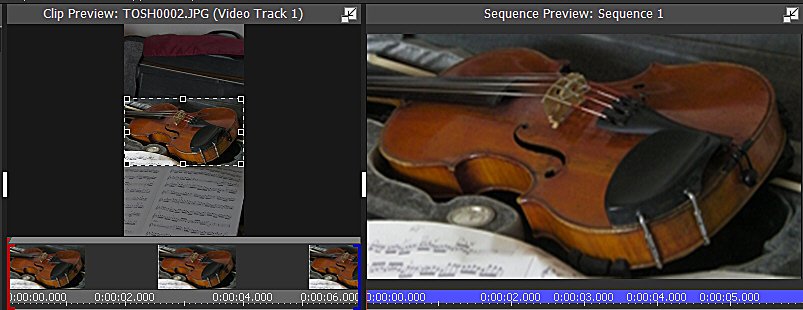
A lot depends on what you want. As far as possible try to make all the clips/images 16:9 at the outset 🙂.
Nat