Hi
Here is a refinement on Borate's method which may be a bit quicker.....
Having created your single image animated ball as I described above, Export it to a folder on your PC as an Image Sequence....Don't forget to set the export format to PNG with Transparency. This will give you a file of quickly made png images each showing the successive positions of the ball, that you can use as Borate describes.
The number of images you end up with depends on the duration of the animation image. Which can be set in Options.
Reopen VP and set the Still Image Duration to 0.5 seconds. (its up to you)
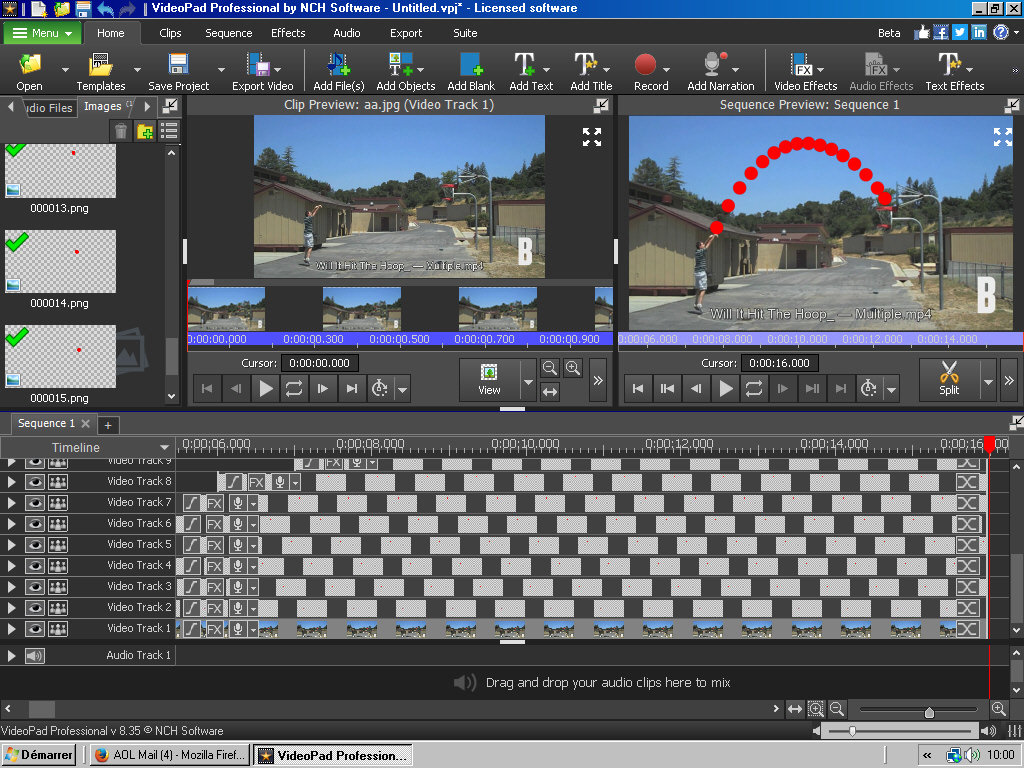
Load all the png ball position images to the clip bin. They will be nicely numbered.
Drop them one at a time onto successive tracks lining the start each one up with then end of the previous one. If you ended up with a lot then use every other one...or every 5th one etc. A one second animated clip duration will give about 15 images. (and use around 17 tracks)
To finish, drag the ends out to make all the tracks the same length
The sequence should then play and the ball will appear every 0.5 seconds and remain in place until the clip ends.
Nat
