Hi Oriol,
Currently, there's no function to replace all silence simultaneously only 1 at a time by "Insert Silence at Cursor".
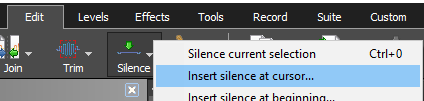
Step 1: Position cursor to where you want to add silence
Step 2: Go to Edit Tab -> Silence, press "Insert Silence at Cursor"
A faster way is to copy (CTRL + C) a 2.75 sec silence and paste (CTRL + V) it to your 0.25 sec silence. No need to copy the silence again since it is already in the clipboard