Hi
".... I saved my video to 'save as', gave it a name but now it has disappeared when I went to open it. ...."
It should be there.......Remember that when you use Save Project or Save Project File As, VP only saves a .vpj file and NOT your video per se. The .vpj file is a text file saved to the folder you designate when you carry out this task (or the default folder set up in Options/Disk ) and that is where you should look.
If you used Save Project, the previous save will be overwritten as Borate explains and there is no warning message. Using Save Project File As allows you to use a different name and will, (provided you do use a different title) save another .vpj file.
Opening the .vpj file should reconstruct your project provided the clips/images/audio is still present on your PC.
"..... Also I want to save the video to a flash drive. ......"
That is not difficult. Just insert the flash drive and designate this when you use the Save Project or Save project As options but again, remember that this only save the .vpj file....not the video.If you are going to use this flash drive every time then set it as the default in Options/Disk
If you want to save the whole project then designate the Flash drive as the destination and use Menu/File/Save Portable Project As. This option (which does not appear under the Save Project tab) will copy all the clips/images/audio to the drive/file designated plus a.vpj file. This means that everything is saved that will enable the project to be transferred to another PC running VP where it can be reconstructed.
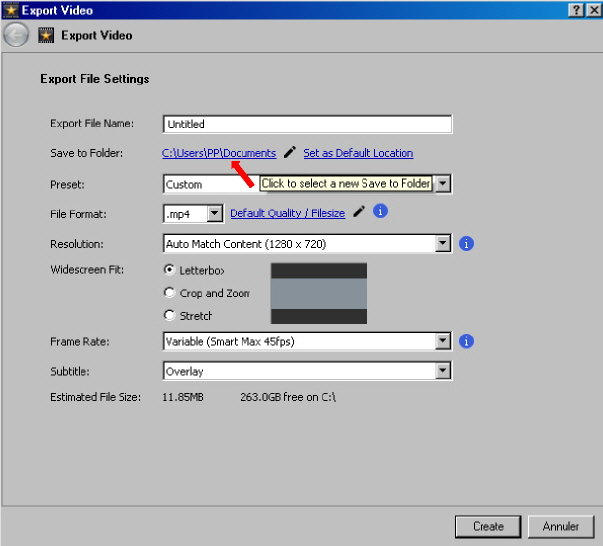
Of course you can also export your project to a connected flash drive (provided it has enough capacity) if you designate this as the Save to Folder on the export window....
Nat