Hi
You should have a vpsetup.exe (or a vppsetup.exe ) file on your PC for your current version and the code for registering it.
Open
https://www.nchsoftware.com/videopad/versions.html
and upload the latest vp version. This will be a vpset.exe file of 2.7 MB.
Simply run this exe file.(no need to enter any code) It will install over your current version.
Snapshot problem......
It might help going to Options and click Show Dual Previews. The right hand preview is the Sequence preview, left hand is Clip Preview. Any selected clip is shown on the left, the image being the frame at the clip preview cursor line position. The right hand pane shows the frame at the timeline cursor position. Consequently both can be different. If you have only one clip on the timeline they MIGHT be the same if you haven't played the sequence.
In the latest versions of VP you can capture either image if you Right Click the relevant screen and select the prompt shown.
If you right click the Sequence preview screen the prompt is......Take Snapshot of Sequence with further options as regards the size.
If you right click the Sequence preview screen the prompt is......Take Snapshot of Clip with further options as regards the size.
Check it out with two different clips on the timeline with the first clip selected. The snapshots come up in the image bin and WILL reflect the cursor position for both previews.
e.g.
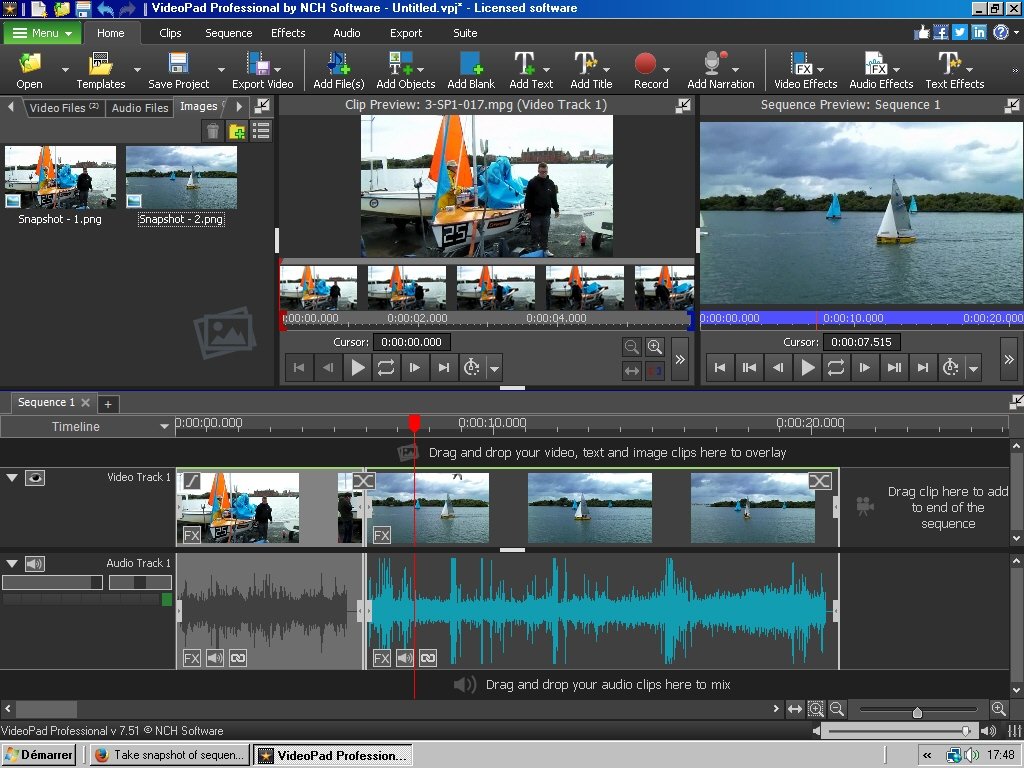
Note this is VP 7.51
Nat
