Hi Borate
" Humm... The opposite appears here. The START|END buttons are available only when the clip is selected from the bin, and not on the time line. "
Just checking......... ?
Nope! I'm right ?
If clip selected on the timeline; clip preview shows the START/END buttons (Below) Note timeline clip is selected and VP is in Clip Preview mode. Logically there is no Place button as clip is already placed on timeline.
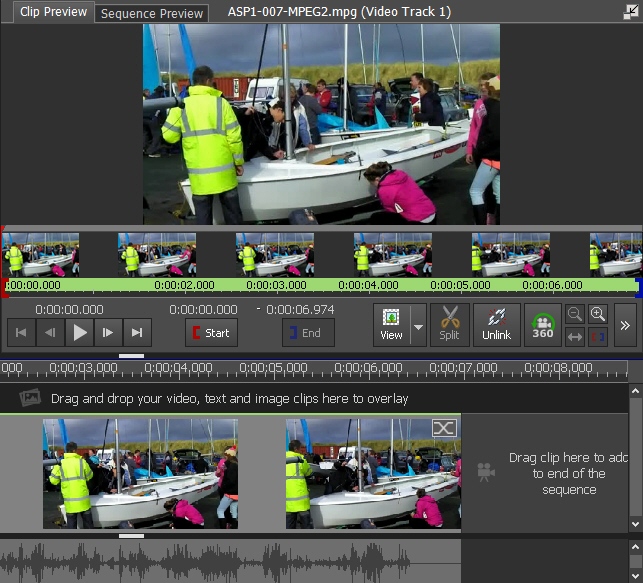
When used with cursor line and the buttons the clip is trimmed on the timeline automatically. The bin clip stays "complete" so it can be reused if necessary. That's fine but.......
If clip selected in the bin; clip preview does NOT show the START/END buttons.(below) Logically there is a Place button now in order to put the result on the timeline.

Without the buttons trimming the clip has to be done by dragging the square brackets (WHY?) and then placing it on the timeline. It achieves the same end result as the top method, so why no buttons and why does it leave the bin clip "trimmed"
My question is:.. Why isn't the preview window the same for both methods (apart from the Place button) and why is the clip left "trimmed" It doesn't need to be. It shouldn't make any difference if you trim the clip before you place it or whether you trim after you have it on the timeline.
" .....START|END show up only when the viewing window is in clip preview mode here, not when in sequence mode."
That's logical. Sequence preview doesn't show the buttons as it's not a single clip (even if it were it wouldn't show even them.) No, my comments were concerning Clip preview. But are you sure yours are opposite to what I see (above)?
Nat