Hi
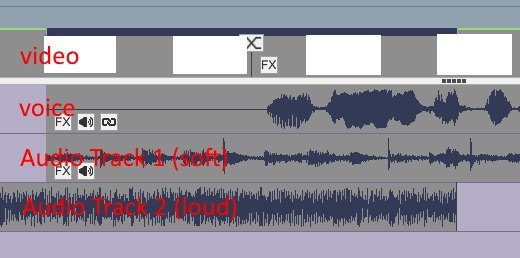
Your images are now visible and clarify things a little. They do show the audio tracks are separate tracks and not simply two clips with audio following each other which I thought was what you had originally.?
However, the track labelled Voice is normally associated with the video and should be Audio Track 1.(You labelled it Audio in the second image.) The track you have labelled Audio Track1 should be Audio Track 2 and is usually associated with Video track2 (Overlay) etc. So the layout you show is a little confusing.but I think it's just the labels you used. ?
Anyway..In the top example..Yes-Audio track 2 will play to the end and stop suddenly as there is no fade out. It is not (apparently) connected with the video and therefore will not be affected by a crossfade transition.
In the lower example audio track 2 should fade out.
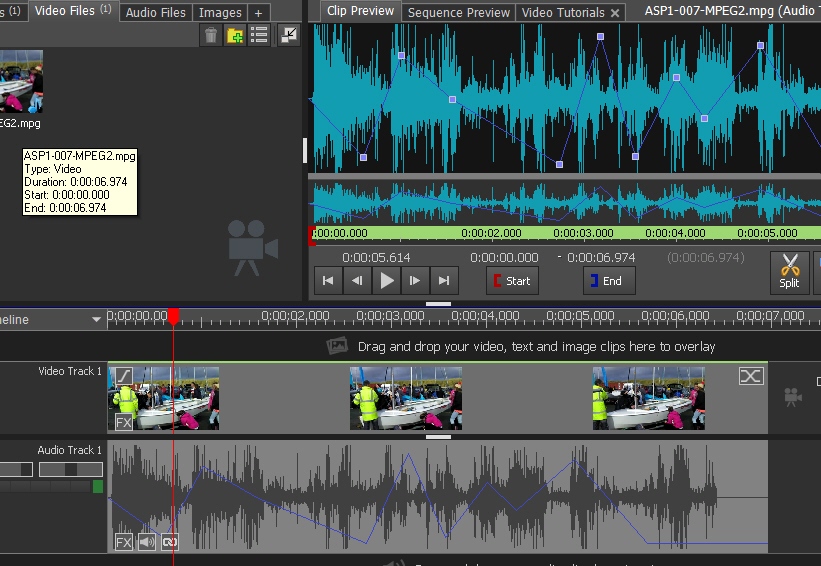
I have duplicated as far as possible your set out.... This is how it should work.......

Two clips are on Video Track1. Clip 1 is silent (actually an image but I could have used a clip with the sound muted.) to match your image. The Audio for the second clip is on Audio track 1 which is normal. (It is labelled Voice but its the Audio for Video Track1.)
I have added a 6 second crossfade with moving clips to the join but the audio is not ticked to crossfade.Even if ticked it would not affect the other Audio tracks.
The SOFT Audio is on Audio Track 2 and is adjusted to to start at the start of the transition. This has a 3 second fade-in as shown by the blue line. (Click the audio on the track; select Fade-in and set 3 seconds.) Consequently it fades in with Clip2
The LOUD audio is on Audio Track 3 and extends to the end of the transition. This has a 3 second fade-out as depicted by the blue line and consequently fades out with Clip1. (Click the audio on the track; select Fade-out and set 3 seconds.)
i.e. The LOUD track fades out to silence as the SOFT track fades into full. The 3 second duration is set as being half the length of the transition.
The voice track simply starts at full volume at the join. (You can add a fade in if required.)
In short..The Loud and Soft tracks overlap and have their fades equal and opposite for the length of the overlap.
Nat